ONE SCAN. YOUR NEXT POSSIBILITY.

You found
Ten Thirty Two.

What would you build if the software worked the way your business does?

We build practical digital systems that make businesses work better.

Find an idea for my business See what we’ve built ↗

Real systems. Real businesses. Built around how you work.

A FAMILIAR QUESTION

YOUR CUSTOMER

“Any update on my order?”

ONE PLACE TO CHECKYour order is ready.

Collection details and the next step, together.

Illustrative customer view

What would a clearer next step look like in your business?

YOUR BUSINESS. YOUR NEXT MOVE.

What could your business do better?

Pick the thing you wish worked differently. Explore an example. Make it your own.

01 / SELL MORE

Help customers find the right thing.

Do people call to ask what you stock? A searchable catalog can connect product details, fitment and an order request.

What could your customers find, order or request online?

I have products to sell
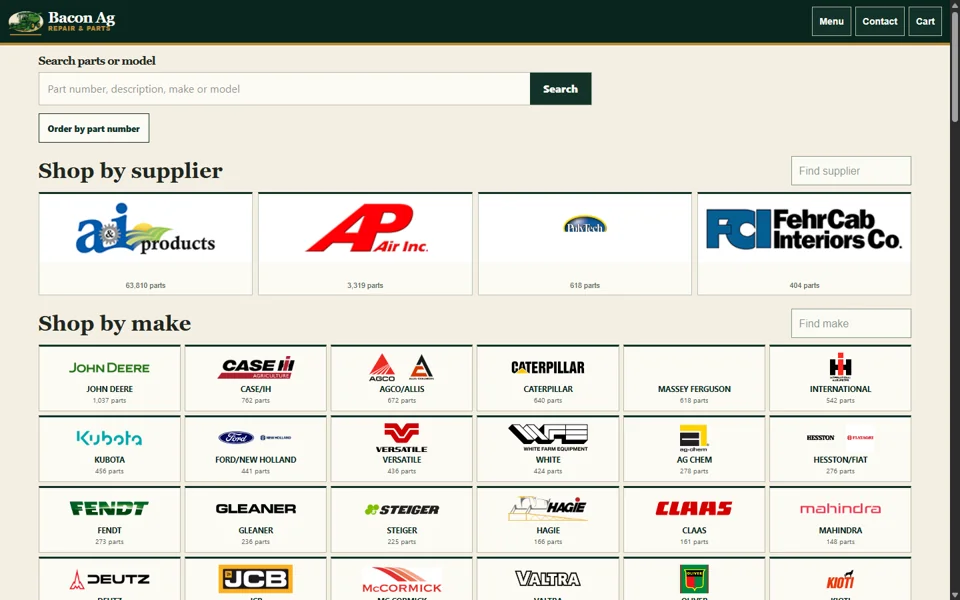
Bacon Ag Repair prelaunch catalog showing equipment makes and parts search
Bacon Ag Repair / In developmentA real parts-store build. Public checkout and customer sales are not claimed.Inspect the catalog example ↗

02 / SAVE TIME

Enter it once. Keep the work moving.

Still copying information between systems? Entering the same order twice? Answering the same questions?

Imagine one request becoming the next step, without another copy and paste.

Ask about my business

ILLUSTRATIVE WORKFLOW / LOCAL DEMONSTRATION

One customer request.

  1. Request captured
  2. Work assigned
  3. Customer update prepared

A sample request is ready. Try the workflow.

This illustrates a possible connection. It runs in your browser and sends nothing.How we scope an integration ↗

03 / KEEP CUSTOMERS INFORMED

“Is it ready yet?”
Give them a place to find out.

Your customers could check an order or repair status without calling the office. Keep updates and the next decision together.

What do your customers keep calling to ask?

Could this work for my business?

CUSTOMER VIEW / LOCAL DEMONSTRATION

Sample repair

We have your equipment.

Your request is checked in. The next step will appear here.

  1. Checked in
  2. Work underway
  3. Ready for collection

No customer account or message is created.Try both sides of the repair workflow ↗

04 / IMPROVE MY WEBSITE

Make the next step obvious.

People should quickly understand what you offer, see reasons to trust you and know how to reach you.

Could a visitor answer these three questions about your website?

Talk about my website

A QUICK SELF-REVIEW

Look at your first screen.

What is already clear?

Choose what your site makes clear. Nothing is submitted.

See websites and campaigns ↗

05 / I HAVE AN IDEA

What have you been thinking about building?

A customer portal. A better booking process. An application that finally connects the pieces. Start with the job you want it to do.

You don’t need a technical brief to begin a conversation.

See how an idea becomes a scoped project ↗

Optional. Keep this to a business idea; leave out private customer details. It stays on this page until you choose a contact option.

You can edit the draft in your messaging app. You choose whether to send it.

REAL WORK. NEW POSSIBILITIES.

Something here could work for you.

Online stores, customer systems, websites and campaigns, and live moments—inspect the work, then imagine a version built around your business.

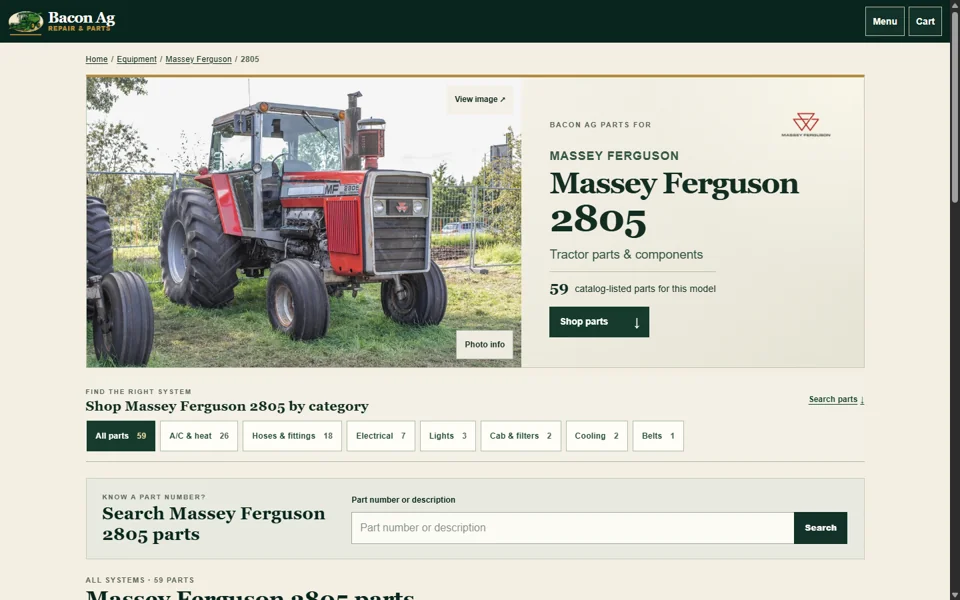
Bacon Ag Repair model page showing parts categories

IN DEVELOPMENT / BACON AG REPAIR

Sell products online.

Make a parts catalog easier to explore. What could your customers find or request?

Inspect the prelaunch store ↗

DEMONSTRATION / CUSTOMER UPDATES

Keep people informed.

Try a repair moving from check-in to approval. Where could a clear status save a phone call?

Try the customer workflow ↗
Ground to Roof Repairs website project artwork; open the link to inspect the current site

LIVE WEBSITE / GROUND TO ROOF REPAIRS

Make the work visible.

A local service website with a clear way to reach the business. What should your first screen make easier?

Open the published website ↗
Explore the full collection ↗

START WITH A CONVERSATION.

Tell us what you wish worked better.

Talk with Michael about your business and the thing you want to change. We’ll discuss what a useful first version could do, then agree the scope and cost before work begins.

Text Ten Thirty Two Call Ten Thirty TwoPrefer email? Write to Michael ↗

Texts open as editable drafts. You review and send them.

Can’t open a text on this device?

Text or call (317) 526-0341, or use the email link above. No website form has been submitted.